A WordPress plugin · v1.0.2 · MIT

Old posts, honestly labelled.

Tells your readers when a post may be out of date, marks the stale ones in the Posts list, and emails your editors a weekly list.

Field Notes · Gardening
How to prune tomato plants

This post was last updated 3 years ago; some information may be out of date.

Pruning keeps a tomato plant’s energy where you want it: in the fruit. Start when the first flowers appear, and work from the bottom up.

A post nobody has touched for three years, with the notice in the plugin’s default style.

Built on mwpd/basic-scaffold. Four features in four parts of WordPress, one service each, none of them aware of the others. Read it as a plugin, or as a way of structuring one.

See how it’s built →

Four small things, one question: is this post outdated?

Old tutorials keep ranking and getting shared long after they stop being right. A post counts as outdated when its last update is older than the limit you set. Publishing counts as the first update; any later save counts as a new one.

  1. Autumn bulb planting checklist3 weeks ago
  2. Composting through the winter5 months ago
  3. 365 days
    the limit you set
  4. Choosing a rain barrel1 year ago · outdated
  5. Seed starting calendar3 years ago · outdated
  6. How to prune tomato plants3 years ago · outdated
  7. Building a raised bed from reclaimed timber5 years ago · outdated
Six posts by the time since their last update. Everything past the limit gets the notice, the mark in the Posts list, and a line in the digest. The default limit is 365 days.
For readers

A notice on the post

A one-line paragraph at the top of outdated single posts. Pages, custom post types, archives and lists are left alone. It comes in the default style shown here, which your theme can change.

How to prune tomato plants

This post was last updated 3 years ago; some information may be out of date.

Pruning keeps a tomato plant’s energy where you want it: in the fruit. Start when the first flowers appear.
For editors

A weekly digest

Editors and Administrators each get an email with up to 20 of the stalest posts, each linked to its editor. When nothing is stale, nothing is sent.

[Field Notes] Posts that need a refresh
  • Building a raised bed from reclaimed timber5 years
  • Seed starting calendar3 years
  • How to prune tomato plants3 years
  • Choosing a rain barrel1 year
For editors

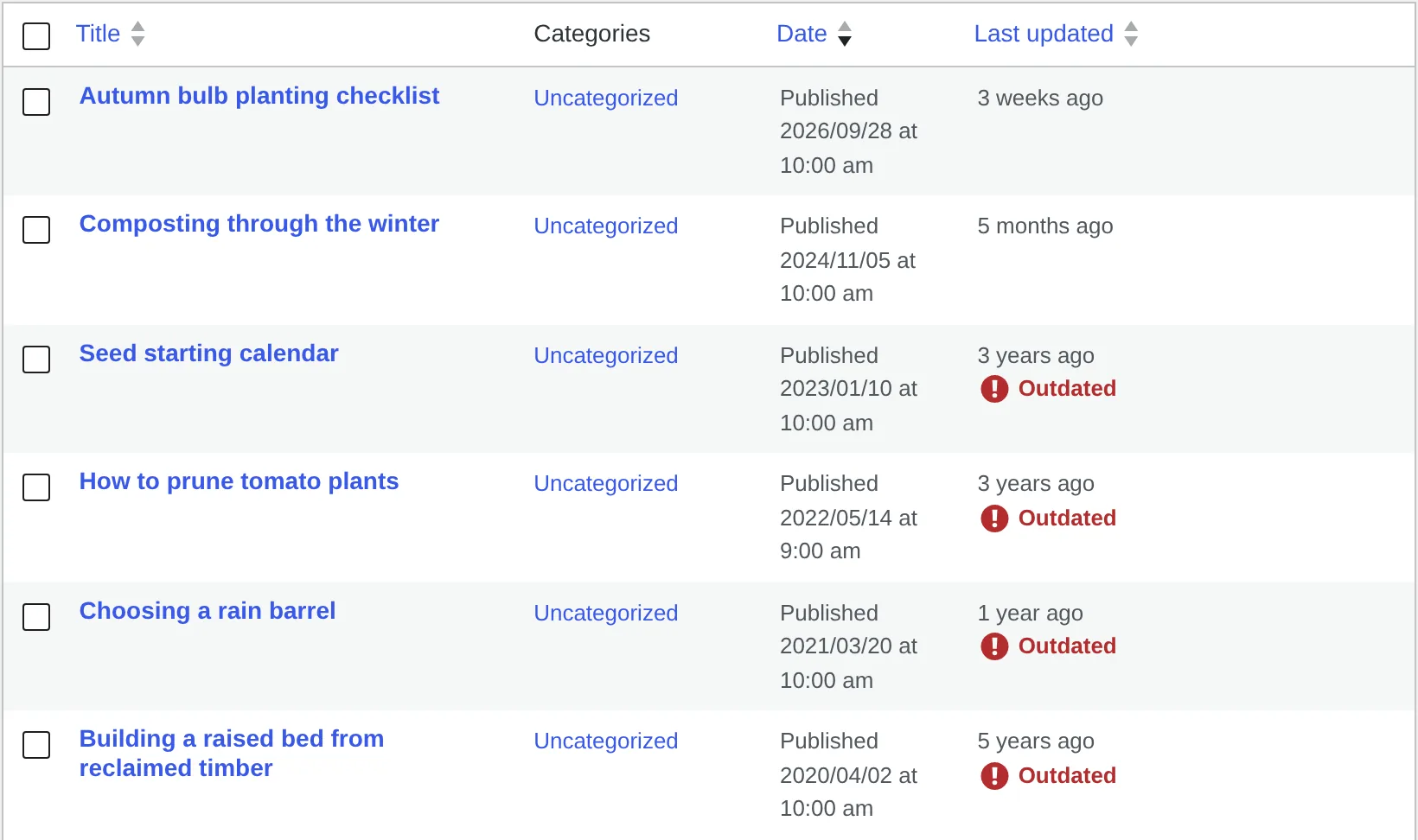
A “Last updated” column

In the Posts list, sortable, with outdated posts marked. Nothing to configure: it appears on the Posts screen and nowhere else.

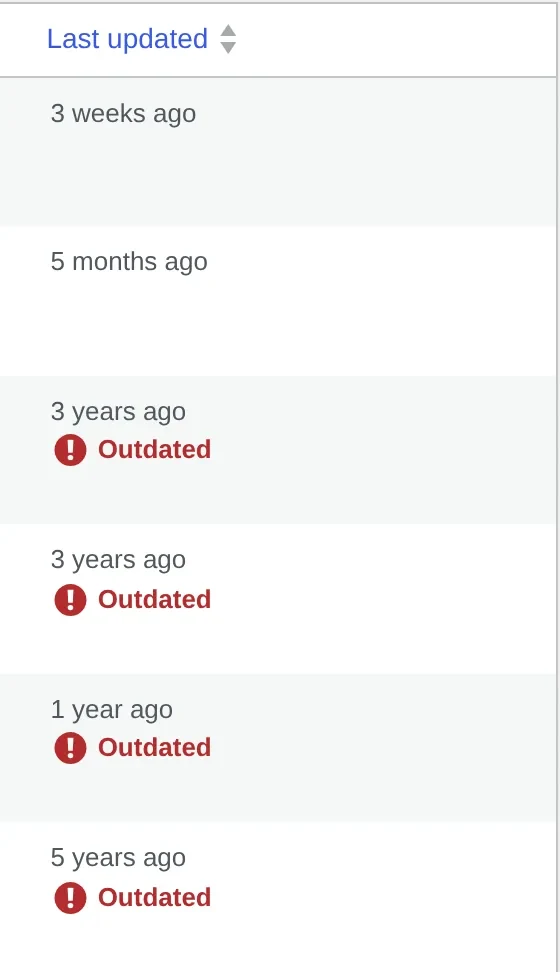
The Posts list with a sortable “Last updated” column; four of six posts are marked “Outdated”. The “Last updated” column of the Posts list, cropped from the full screenshot: four of six posts are marked “Outdated”.
The Posts list of a test site. On narrow screens this shows the “Last updated” column alone.
View full size
For site owners

One setting

Under Settings › Reading: after how many days a post counts as outdated, from 1 to 36500. The default is 365.

Settings › Reading: “Posts become outdated after” set to 365 days, with a line of help text below. Settings › Reading: “Posts become outdated after” set to 365 days, cropped from the full screenshot.
The field in Settings › Reading. On narrow screens the help text is cropped away.
View full size

Install, activate, done.

WordPress 6.0+, tested up to 7.1 PHP 7.4+ No account or external service MIT licence
  1. Download content-freshness.zip from the latest release.

  2. Upload it under Plugins › Add New › Upload Plugin and activate it.

  3. Optionally change the limit under Settings › Reading. The first digest goes out a week later.

# or, instead of steps 1 and 2,
# with WP-CLI
$ wp plugin install \
  https://github.com/\
mwpd/content-freshness/releases/\
latest/download/\
content-freshness.zip \
  --activate

Changing the notice

It comes with a default style. Restyle it through .mwpd-content-freshness-notice, or dequeue the mwpd-content-freshness-notice style handle and bring your own. To change the markup, copy any template from the plugin’s views/ into content-freshness/views/ in your theme.

No digest arriving?

It’s sent by WP-Cron through wp_mail(). On quiet sites, add a real cron job; if no site email arrives, add an SMTP plugin.

On multisite

Activate it per site, or for the whole network: that sets the digest up in every site, and in sites created later. Each site keeps its own setting. Updating a network-active 1.0.0 to 1.0.1? Deactivate and activate it for the network once more.

Removing it

Deactivating keeps your setting. Deleting removes it and the weekly event, the only two things the plugin stores, from every site of a network.

Download content-freshness.zip Latest release, from GitHub. Release notes
How it is built

A simple plugin, built to show an approach.

Content Freshness is the worked example for mwpd/basic-scaffold, a template for WordPress plugins whose complexity grows one service at a time. The features are deliberately modest. They touch four different parts of WordPress, which makes them useful for showing how the scaffold keeps each part separate.

  • Runs onWordPress 6.0+, PHP 7.4+
  • Static analysisPHPStan level max, Psalm level 2
  • Tests in CIPHP 7.4 and 8.3, end-to-end on WordPress 6.0 and latestOn every push
  • Runtime dependenciesNone. No Composer packages, no build step

One feature, one service

The composition root lists the four services. None of them knows the others exist. The notice came first; each later feature was its own commit, adding a service and a line here without changing the ones before it.

return [
	self::OUTDATED_POST_NOTICE_ID
		=> OutdatedPostNotice::class,
	self::POST_AGE_COLUMN_ID
		=> PostAgeColumn::class,
	self::FRESHNESS_SETTING_ID
		=> FreshnessSetting::class,
	self::STALE_CONTENT_DIGEST_ID
		=> StaleContentDigest::class,
];
src/ContentFreshnessPlugin.php, trimmed
  1. Add the outdated post notice22eeb3e+764 / −297The first feature. Replaces a sample service of the scaffold and reworks the composition root.
  2. Add the post age columnb79fd37+534 / −194Replaces the scaffold’s other sample service; swaps its entry in the composition root for its own.
  3. Add the freshness setting3b845e6+447 / −0Touches no existing service. Adds its entry to the composition root, and three stubs to the column’s test.
  4. Add the stale content digest4f6b654+1,005 / −4Touches no existing service. Adds its entry and one binding to the composition root; extends shared test fixtures.
Every feature after the first was added without editing a service that already existed. The numbers are the commits’ own diff stats, tests included; the rule the setting needed to join Settings › Reading came in a commit of its own.

Services say where and when, the scaffold does the rest

Each service implements small capability interfaces. A service that isn’t needed for a request is never instantiated, and nothing branches on multisite: the scaffold visits each site for services that ask for it.

OutdatedPostNoticeSingle posts, once the query has runConditional · Delayed · Registerable · HasAssets
PostAgeColumnThe Posts list screen onlyConditional · Delayed · Registerable
FreshnessSettingAdmin requests; cleans up on uninstallDelayed · Registerable · SiteUninstallable
StaleContentDigestEvery request; schedules per siteRegisterable · SiteActivateable · SiteDeactivateable · SiteInitializable · SiteUninstallable
Conditional
Instantiated only in requests that need it.
Delayed
Registers at a later hook, once WordPress knows enough.
Registerable
Adds its hooks in register(), never in the constructor.
HasAssets
Names its styles; the plugin enqueues them where it runs.
SiteActivateable · SiteDeactivateable
Set up and cleaned up in each site an activation reaches.
SiteInitializable
Set up in sites created later on a network.
SiteUninstallable
Removes its data from each site on uninstall.

One rule, swappable

No feature reads the setting itself. They all ask a FreshnessPolicy interface. Bind your own class, for example to leave an evergreen category alone, and the notice, column and digest all follow it unchanged.

use MWPD\ContentFreshness\Freshness\{
	FreshnessPolicy
};

add_filter(
	'mwpd.content_freshness.bindings',
	static function ( array $bindings ): array {
		$bindings[
			FreshnessPolicy::class
		] = My_Freshness_Policy::class;

		return $bindings;
	}
);
From the README, reflowed. My_Freshness_Policy is your class.

Rules a coding agent can follow

The architecture is written down and checked by tools, so a coding agent gets the same guidance as a person, and finds out right away when it strays.

AGENTS.md

The repository map, the commands, the design principles in short, and the hard rules.

Failures that explain

Architecture rules run in the tests and in PHPStan. Every failure says what to do instead.

The need before the workaround

Before reaching for a singleton or a global, an agent looks up the plugin’s way in docs/patterns.md.

No shortcuts to green

No lowered analysis levels, baselines or deleted tests. Claims are verified against the source, not memory.

1 · The agent writes
public function __construct() {
	add_filter( 'the_content', … );}
2 · composer lint says
Hooks are added in a constructor.

Implement Registerable and add them in register(). See docs/patterns.md.

3 · The agent fixes
public function register(): void {
	add_filter( 'the_content', … );}
Simplified. The real rules and their messages are listed in docs/architecture-rules.md.

Contributing

Unit, integration, architecture and end-to-end tests, plus PHPCS, PHPStan (level max) and Psalm. CI runs them on PHP 7.4 and 8.3, and the end-to-end suite on WordPress 6.0 and the latest release.

$ composer install
$ composer test && composer lint
$ npm ci && npm run e2e
The scaffold

Start your plugin from the same scaffold

mwpd/basic-scaffold is everything above without the features: a service container, an injector, the capability interfaces, and architecture rules that explain their own failures. No runtime Composer dependencies; it runs on PHP and WordPress alone.

Its own page walks through this plugin commit by commit.

